Metric · Project
Reading the Metric page
Sidebar → Project → Metric. Shows, for each buy wallet, what it cost, what it bought and sold, and the realised profit or loss.
Screenshots come from the current frontend running in a headless browser. The server, the chain and the browser wallet were simulated, so addresses and transaction hashes are placeholders. Token amounts were calculated from the pool above, so the numbers agree from page to page.
What to watch for
- Profit counts sold tokens only. Tokens still held count as nothing, so a wallet that hasn't sold shows −100% even if the price went up.
- Profit can't be measured on a v4 pool. The ETH a sale pays out is only visible on v2 and v3 pools. On v4 the profit columns show n/a; bought and sold amounts are still exact.
The page, top to bottom
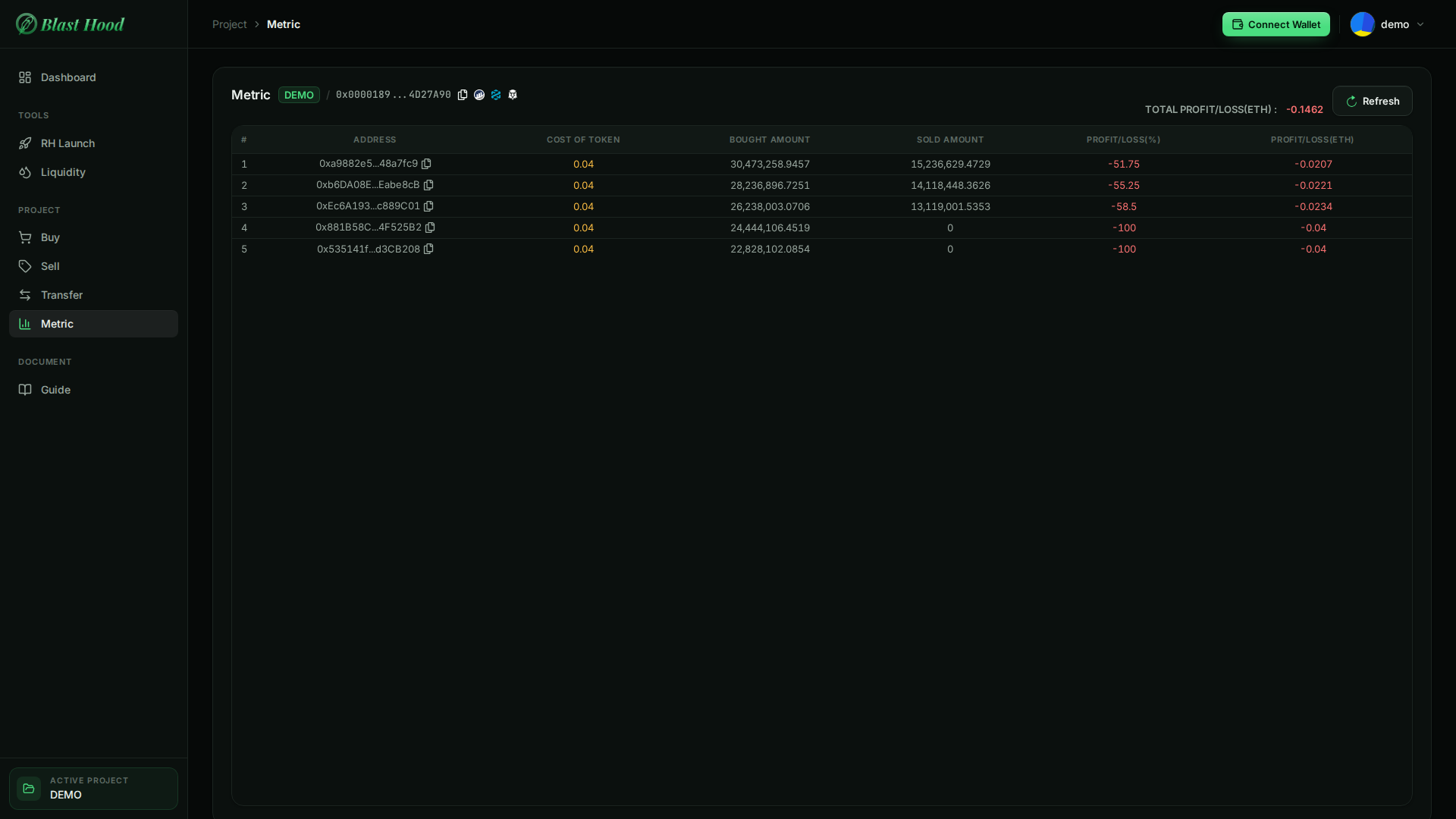
The page
The figures load when you open the page and again when you press Refresh. They are read from the chain, so a refresh takes a few seconds.
The example is the launch plus the 50% sell from wallets 1–3 shown on the Sell page.

What each column means
- Cost of token: the ETH the wallet's launch buy spent (about 80% of ETH per wallet; the rest stayed as gas), plus any buys from the Buy page.
- Bought amount: tokens that arrived from the pool, after any tax.
- Sold amount: tokens the wallet sent back to the pool.
- Profit/Loss (ETH): ETH received from sales − cost.
- Profit/Loss (%): that, as a percentage of cost.
Losses are red, profits green.

Total
TOTAL PROFIT/LOSS (ETH) is the sum of the Profit/Loss (ETH) column.
"Failed to get metrics data" means the project hasn't launched yet, or the launch has no token or pool recorded.

Tokens in a v4 pool
n/aOn a v4 pool the ETH a sale pays out stays inside Uniswap's pool manager and can't be traced to the wallet, so the profit columns and the total show n/a with an explanation. Cost, bought and sold amounts are still exact.